I need to configure my router remotely, and links etc won't work because the router config page uses javascript and refuses to run without it.
Obviously, shame on netgear for being this crap, but is there a text mode browser that will allow their abortion to run?
7 Answers
edbrowse claims to support JavaScript (but I've never used it)
As ed is the standard editor edbrowse may become the standard browser ;-).
2Check which version of elinks you have.
elinks -version ELinks 0.12pre6 #Not the version that supports ECMAScript The article "Building eLinks Text-based Web Browser with (Some Sort of) JavaScript Support" describes how to get javascript configured in elinks.
It notes that the resulting version of elinks still doesn't work with lots of web pages, which is perhaps why javascript support is not enabled by default in the elinks version in Ubuntu.
Other even less successful alternatives are noted also: links2 and w3m + w3m-js extension.
A quick summary of the commands for building an elinks that supports ECMAScript follows:
wget tar xjvf elinks-current-0.13.tar.bz2 cd elinks-0.13* ./configure #Check for ECMAScript support. make -j8 sudo make install Browsh is a modern text-based browser, which runs on the terminal. According to its website, "It renders anything that a modern browser can; HTML5, CSS3, JS, video and even WebGL". It works much better than elinks. It's written in Go, so it's a single executable file, and available on most major platform (Linux, Mac, Windows, etc). (There was also a live demo, which can be accessed via SSH: $ ssh brow.sh but it is currently off-line)
None of the above answers worked for me out of the box. elinks though is the only one pretty much capable this is what I did:
sudo apt install libmozjs185-dev pkg-config libssl-dev Very important to have installed pkg-config, without it configure cannot detect SpiderMonkey Javascript engine, without libssl-dev you cannot access HTTPS sites.
wget unpack:
tar xvf elinks-current-0.13.tar.bz2 cd elinks-0.13-20171228/ then configure and check if javascript is seen:
./configure | grep -i "javascript" Result should be:
ECMAScript (JavaScript) ......... SpiderMonkey document scripting if result is
ECMAScript (JavaScript) ......... no check the steps above until the right result is give.
Then make the sources
make -j8 And install it:
sudo make install Now enable and try it, by running:
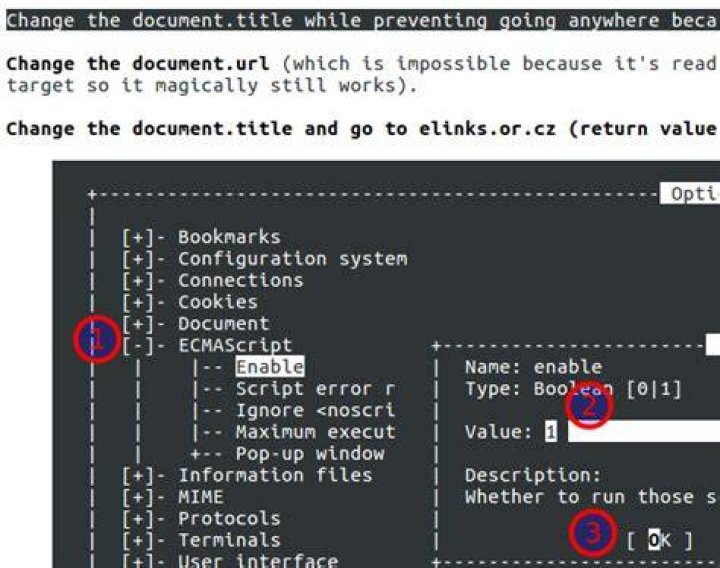
elinks ./test/ecmascript/protocol.html Press Alt+S, O Key down (↓) and then Space on ECMAScript, Alt+E on Enable change to 1
Alt+V to save and then OK
Now it's able to execute some Javascript.
1There is a good feature comparison table at Linux Journal
1See this answer: as of v0.23, Web Adjuster has a PhantomJS option, which can partially Javascript-enable any browser with the help of PhantomJS. I say "partially" because it's not (yet?) working with POST forms and Javascript-only links, but it's fine for reading the text of a page which requires Javascript before showing you that text.
sudo apt-get install python-selenium wget tar -jxvf phantomjs-2.1.1-linux-i686.tar.bz2 cd phantomjs-2.1.1-linux-i686/ sudo mv bin/phantomjs /usr/local/bin/ cd .. sudo apt-get install python-tornado wget python adjuster.py --PhantomJS --real_proxy and in another window or tab
http_proxy= lynx Disclosure: Web Adjuster maintainer here.
$ chromium --headless --disable-gpu --dump-dom |html2text
1